
Skip to content
Protolyst
  • Blog
  • Docs
  • Pricing
  • Login
  • GET STARTED

1. New to Protolyst

  • Citation styles: choose, build or import your own
  • 🚩Start Here
  • Create your First Page
  • Choosing a Page Type
  • Adding Information into your Workspace
  • Simple Work Flow: Capturing and Using Atoms
  • Workspace Layout
  • Capturing Atoms
  • Create a Table
  • Table Views
  • Organising Pages in your Workspace
  • Adding Citations & References to your Writing
  • Download and Export

2. Connecting your Workspace

  • Using Templates in Tables
  • How to Use Sub-Pages
  • How to Use Linked Pages
  • Connecting Atoms across your Workspace
  • Viewing and Organising Atoms in Tables
  • Atom Inheritance in your Workspace
  • How To Use Linked Tables
  • Create Pages From Atoms
  • Using Tags on Protolyst
  • Moving your Files and using Folders on Protolyst
  • Writing with your Atoms

Quick Tips

  • Renaming your Workspace
  • Workspace Keyboard Shortcuts
  • Copy-Pasting Pages
  • Searching your Workspace
  • Equations
  • Download and Export
  • Splitscreen
  • Checklists
  • Dark Mode

Protolyst for Research

  • Organising your Research Notes Efficiently on Protolyst
  • How to Write a Literature Review on Protolyst
  • Academic Reading on Protolyst – Quick Start Guide
  • How to Read a Research Paper
  • How to Build an Academic Reading System
  • Collecting and Organising Information from Research Papers

Protolyst for Notetaking

  • Customising your Pages
  • Adding Images to your Pages
  • Formatting your Notes
  • How to Research and Write an Article Fast on Protolyst
  • Note Taking on Protolyst
  • Simple First Zettelkasten on Protolyst
  • Technical Notetaking – Easily Add & Use Equations in your Notes
  • Cornell Notes for Notetaking on Protolyst

Protolyst for Organisation

  • Life Organisation with the PARA Method
  • Organising your To Dos on Protolyst
  • How to Write a Well Evidenced Essay, Fast
  • How to Manage Hiring & Recruitment on Protolyst
  • How to Write a Blog Post on Protolyst Using Your Atomic Knowledge Base

Protolyst Portals

  • Portals
  • Adding Content to Portals
  • Portal Set Up
  • Home
  • Docs
  • 1. New to Protolyst
  • Choosing a Page Type
View Categories

Choosing a Page Type

2 min read

0:00 / 2:08
  • View as Markdown Open this page as plain Markdown (opens in a new tab)
  • Open in ChatGPT Ask questions about this page (opens in a new tab)
  • Open in Claude Ask questions about this page (opens in a new tab)
  • Open in Google AI Studio Ask questions about this page (Google account required) (opens in a new tab)

When you create a page, Protolyst asks you to Choose a type for this page. The type decides what the page holds. Hover over each button to see its name.
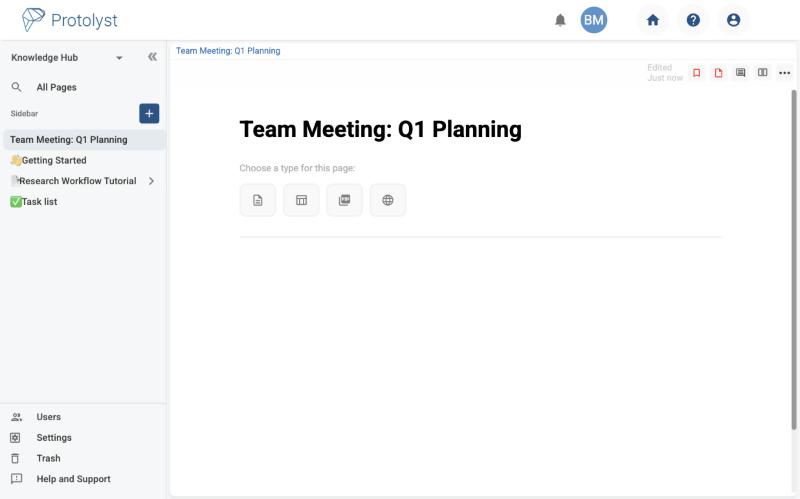
A new page in Protolyst showing the prompt Choose a type for this page with four page type buttons

Text Editor #

A live, collaborative text editor for notes, reports, meeting minutes and drafts. Add headings, lists, images, embeds and links to other pages. See Formatting your Notes.

Table #

A table shows many pages at once. Every row is a page in its own right, so you can open any row to write in it or attach files. Add columns (called properties) for the details you want to track, such as an author, a status or a date.
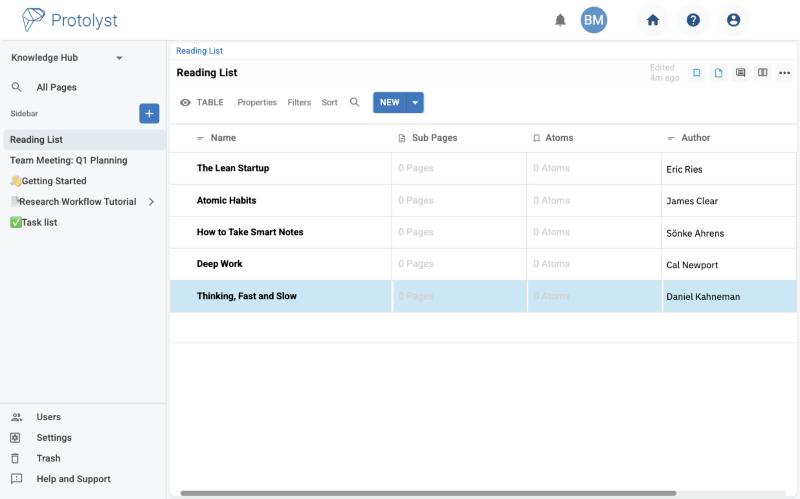
A Reading List table with book titles and an Author column
A reading list kept as a table, with an Author column

Switch how a table looks with its views: Table, Gallery, Vertical, Kanban and Calendar (in beta).

File Upload #

Upload a document to read, highlight and capture Atoms from. Protolyst accepts PDF, Word (.doc and .docx) and PowerPoint (.ppt and .pptx) files. Word and PowerPoint files can be up to 30 MB.

Tip: To upload several files at once, drag them onto a table. Each file becomes its own row.

Web Page #

Import an online article as clean, uncluttered text so you can read it and capture Atoms from it. Choose Web Page, paste the address into Paste a URL and click Import.
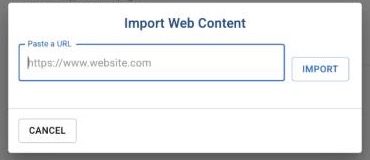
The Import Web Content dialog with a Paste a URL field and an Import button
The Import Web Content dialog
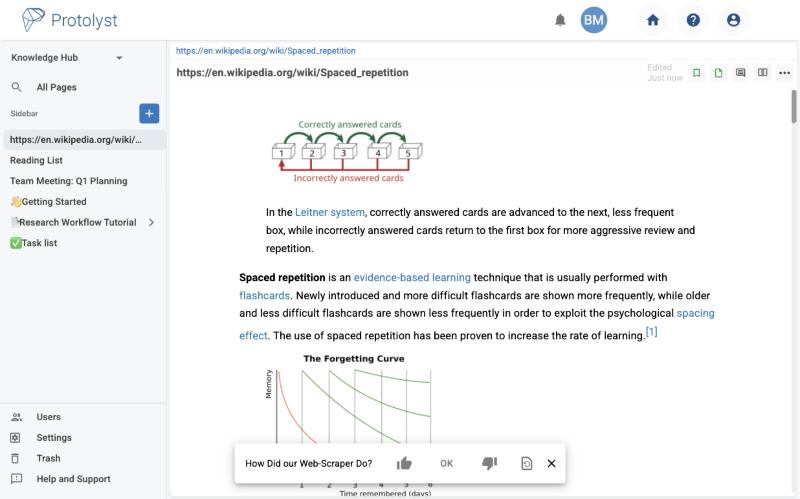
A Wikipedia article imported into Protolyst as a Web Page, with the web scraper feedback bar
An article imported as a Web Page

After an import, a bar asks How Did our Web-Scraper Do?. Your answer helps us improve imports. If an import does not look right, use the reset button on that bar, or Reset Page Type in the page’s ⋯ menu, to turn it back into a normal page.

Tip: The page takes the web address as its title. You can rename it to something more readable at any time.

Page Template (inside tables) #

When you add a row to a table, you will also see Page Template. Use it to start the row from a template saved in that table, so every row follows the same layout.

The page type buttons shown for a new row inside a table, including Page Template
Inside a table, new rows can also use a Page Template

Changing a page’s type #

Open the ⋯ menu at the top right of the page and choose Reset Page Type, then Reset to Typeless Page. You can then choose a new type.

What are your Feelings

Share This Article :

  • Facebook
  • X
  • LinkedIn
  • Pinterest
Still stuck? How can we help?

How can we help?

Updated on November 10, 2026
Create your First PageAdding Information into your Workspace

Powered by BetterDocs

Table of Contents
  • Text Editor
  • Table
  • File Upload
  • Web Page
  • Page Template (inside tables)
  • Changing a page's type
About

You're wasting 1 day a week refinding the golden nuggets of info buried in your files and folders. Protolyst is a networked note taking web app where you can collect and categorise each individual highlight to find and use your most valuable info fast.

Site
  • Docs
  • Blog
  • Pricing
  • Cookie Policy
  • Privacy Policy

Use For

  • Studying
  • Reading and annotating
  • Reading lists
  • Writing reports
  • Research
  • Teams
We use cookies to understand how people use our site so we can improve it. Analytics cookies are only set if you click “Accept All”.
Cookie SettingsReject AllAccept All
Manage consent

Privacy Overview

This website uses cookies to improve your experience while you navigate through the website. Out of these, the cookies that are categorized as necessary are stored on your browser as they are essential for the working of basic functionalities of the website. We also use third-party cookies that help us analyze and understand how you use this website. These cookies will be stored in your browser only with your consent. You also have the option to opt-out of these cookies. But opting out of some of these cookies may affect your browsing experience.
Necessary
Always Enabled
Necessary cookies are absolutely essential for the website to function properly. These cookies ensure basic functionalities and security features of the website, anonymously.
CookieDurationDescription
cookielawinfo-checkbox-analytics11 monthsThis cookie is set by GDPR Cookie Consent plugin. The cookie is used to store the user consent for the cookies in the category "Analytics".
cookielawinfo-checkbox-functional11 monthsThe cookie is set by GDPR cookie consent to record the user consent for the cookies in the category "Functional".
cookielawinfo-checkbox-necessary11 monthsThis cookie is set by GDPR Cookie Consent plugin. The cookies is used to store the user consent for the cookies in the category "Necessary".
cookielawinfo-checkbox-others11 monthsThis cookie is set by GDPR Cookie Consent plugin. The cookie is used to store the user consent for the cookies in the category "Other.
cookielawinfo-checkbox-performance11 monthsThis cookie is set by GDPR Cookie Consent plugin. The cookie is used to store the user consent for the cookies in the category "Performance".
viewed_cookie_policy11 monthsThe cookie is set by the GDPR Cookie Consent plugin and is used to store whether or not user has consented to the use of cookies. It does not store any personal data.
Functional
Functional cookies help to perform certain functionalities like sharing the content of the website on social media platforms, collect feedbacks, and other third-party features.
Performance
Performance cookies are used to understand and analyze the key performance indexes of the website which helps in delivering a better user experience for the visitors.
Analytics
Analytical cookies are used to understand how visitors interact with the website. These cookies help provide information on metrics the number of visitors, bounce rate, traffic source, etc.
Advertisement
Advertisement cookies are used to provide visitors with relevant ads and marketing campaigns. These cookies track visitors across websites and collect information to provide customized ads.
Others
Other uncategorized cookies are those that are being analyzed and have not been classified into a category as yet.
SAVE & ACCEPT