Skip to content
Protolyst
  • Blog
  • Docs
  • Pricing
  • Login
  • GET STARTED

1. New to Protolyst

  • 🚩Start Here
  • Create your First Page
  • Choosing a Page Type
  • Adding Information into your Workspace
  • Simple Work Flow: Capturing and Using Atoms
  • Workspace Layout
  • Capturing Atoms
  • Create a Table
  • Table Views
  • Organising Pages in your Workspace
  • Adding Citations & References to your Writing
  • Citation styles: choose, build or import your own
  • Download and Export
  • The Protolyst API: connect your workspace to n8n, Claude and more

2. Connecting your Workspace

  • Using Templates in Tables
  • How to Use Sub-Pages
  • How to Use Linked Pages
  • Connecting Atoms across your Workspace
  • Viewing and Organising Atoms in Tables
  • Atom Inheritance in your Workspace
  • How To Use Linked Tables
  • Create Pages From Atoms
  • Using Tags on Protolyst
  • Moving your Files and using Folders on Protolyst
  • Writing with your Atoms

Quick Tips

  • Renaming your Workspace
  • Workspace Keyboard Shortcuts
  • Copy-Pasting Pages
  • Searching your Workspace
  • Equations
  • Download and Export
  • Splitscreen
  • Checklists
  • Dark Mode

Protolyst for Research

  • Organising your Research Notes Efficiently on Protolyst
  • How to Write a Literature Review on Protolyst
  • Academic Reading on Protolyst – Quick Start Guide
  • How to Read a Research Paper
  • How to Build an Academic Reading System
  • Collecting and Organising Information from Research Papers

Protolyst for Notetaking

  • Customising your Pages
  • Adding Images to your Pages
  • Formatting your Notes
  • How to Research and Write an Article Fast on Protolyst
  • Note Taking on Protolyst
  • Simple First Zettelkasten on Protolyst
  • Technical Notetaking – Easily Add & Use Equations in your Notes
  • Cornell Notes for Notetaking on Protolyst

Protolyst for Organisation

  • Life Organisation with the PARA Method
  • Organising your To Dos on Protolyst
  • How to Write a Well Evidenced Essay, Fast
  • How to Manage Hiring & Recruitment on Protolyst
  • How to Write a Blog Post on Protolyst Using Your Atomic Knowledge Base

Protolyst Portals

  • Portals
  • Adding Content to Portals
  • Portal Set Up
  • Home
  • Docs
  • 2. Connecting your Workspace
  • How To Use Linked Tables
View Categories

How To Use Linked Tables

2 min read

0:00 / 1:45
  • View as Markdown Open this page as plain Markdown (opens in a new tab)
  • Open in ChatGPT Ask questions about this page (opens in a new tab)
  • Open in Claude Ask questions about this page (opens in a new tab)
  • Open in Google AI Studio Ask questions about this page (Google account required) (opens in a new tab)

Linked Tables work in a similar manner to Linked Pages, but linking is limited to Pages within one chosen Table rather than across the entire workspace. Linked Tables makes use of the Linked Table Property Type available to add into your Tables.
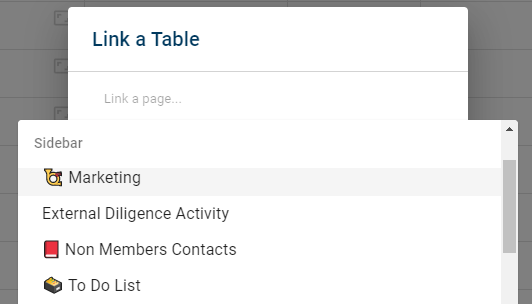
To link Table 1 to Table 2

  1. In Table 1, add a new property with “+ PROPERTY“
  2. Choose “Linked Table” as the property type
  3. Select the Table to link – ie. “Table 2”

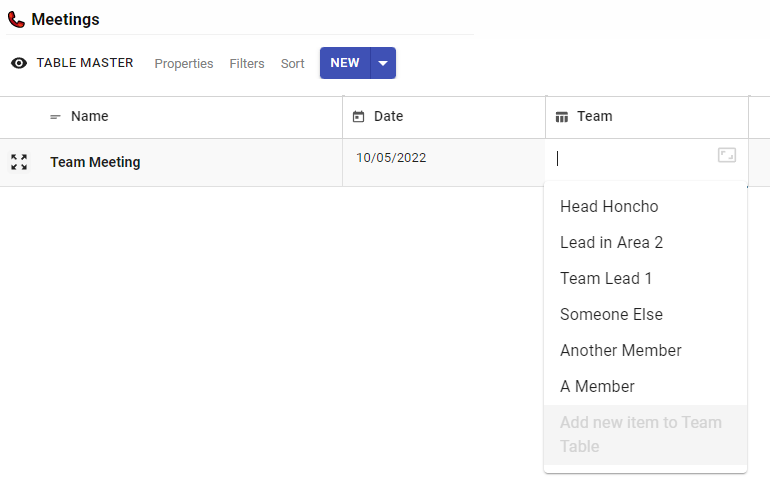
Now any of the Pages in Table 1, can be connected to Pages in Table 2 in the Linked Table Column
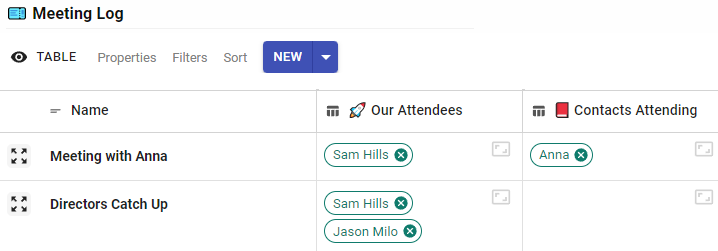
A linked table example where a “Meeting Log” Table is linked to a “Team” Table and “Contacts” Table

Atom Inheritance #

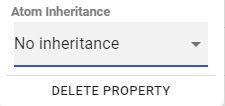
There is also the option to define ‘Atom Inheritance’ in the Linked Table property options:

  1. Inherit Atoms from ‘Linked Table’
  2. Pass Atoms to ‘Linked Table’
  3. No Inheritance

Any Atoms captured in a Linked Page can be automatically inherited by a Page (Inherit Atoms) or vice versa, Atoms captured in a Page can be inherited by the Linked Page (Pass Atoms).

What happens with atom inheritance, considering the Meeting Log table above:

The ‘Meeting with Anna’ Page has been connected to the ‘Anna’ page in the Linked Table in the column Contacts Attending.

For option 1 (inherit atoms from ‘Linked Table’) – any Atoms captured in the ‘Anna’ page will display in the current Table as Atoms of the Meeting with Anna Page

For option 2 (pass Atoms to ‘Linked Table’) – any atoms captured in the ‘Meeting with Anna’ Page will display in the ‘Anna’ Page of the Linked Table

For option 3 (no inheritance) – there will be no ‘sharing’ of Atoms between the ‘Meeting with Anna’ and ‘Anna’ pages. Atoms captured in the ‘Meeting with Anna’ page will only display as Atoms in the current Table, no Atoms from ‘Anna’ will appear here and similarly in the Linked Table.

Any Atoms captured in the ‘Meeting with Anna’ Page

Happy Connecting!

What are your Feelings

Share This Article :

  • Facebook
  • X
  • LinkedIn
  • Pinterest
Still stuck? How can we help?

How can we help?

Updated on June 1, 2023
Atom Inheritance in your WorkspaceCreate Pages From Atoms

Powered by BetterDocs

Table of Contents
  • Atom Inheritance
About

You're wasting 1 day a week refinding the golden nuggets of info buried in your files and folders. Protolyst is a networked note taking web app where you can collect and categorise each individual highlight to find and use your most valuable info fast.

Site
  • Docs
  • Blog
  • Pricing
  • Cookie Policy
  • Privacy Policy

Use For

  • Studying
  • Reading and annotating
  • Reading lists
  • Writing reports
  • Research
  • Teams
We use cookies to understand how people use our site so we can improve it. Analytics cookies are only set if you click “Accept All”.
Cookie SettingsReject AllAccept All
Manage consent

Privacy Overview

This website uses cookies to improve your experience while you navigate through the website. Out of these, the cookies that are categorized as necessary are stored on your browser as they are essential for the working of basic functionalities of the website. We also use third-party cookies that help us analyze and understand how you use this website. These cookies will be stored in your browser only with your consent. You also have the option to opt-out of these cookies. But opting out of some of these cookies may affect your browsing experience.
Necessary
Always Enabled
Necessary cookies are absolutely essential for the website to function properly. These cookies ensure basic functionalities and security features of the website, anonymously.
CookieDurationDescription
cookielawinfo-checkbox-analytics11 monthsThis cookie is set by GDPR Cookie Consent plugin. The cookie is used to store the user consent for the cookies in the category "Analytics".
cookielawinfo-checkbox-functional11 monthsThe cookie is set by GDPR cookie consent to record the user consent for the cookies in the category "Functional".
cookielawinfo-checkbox-necessary11 monthsThis cookie is set by GDPR Cookie Consent plugin. The cookies is used to store the user consent for the cookies in the category "Necessary".
cookielawinfo-checkbox-others11 monthsThis cookie is set by GDPR Cookie Consent plugin. The cookie is used to store the user consent for the cookies in the category "Other.
cookielawinfo-checkbox-performance11 monthsThis cookie is set by GDPR Cookie Consent plugin. The cookie is used to store the user consent for the cookies in the category "Performance".
viewed_cookie_policy11 monthsThe cookie is set by the GDPR Cookie Consent plugin and is used to store whether or not user has consented to the use of cookies. It does not store any personal data.
Functional
Functional cookies help to perform certain functionalities like sharing the content of the website on social media platforms, collect feedbacks, and other third-party features.
Performance
Performance cookies are used to understand and analyze the key performance indexes of the website which helps in delivering a better user experience for the visitors.
Analytics
Analytical cookies are used to understand how visitors interact with the website. These cookies help provide information on metrics the number of visitors, bounce rate, traffic source, etc.
Advertisement
Advertisement cookies are used to provide visitors with relevant ads and marketing campaigns. These cookies track visitors across websites and collect information to provide customized ads.
Others
Other uncategorized cookies are those that are being analyzed and have not been classified into a category as yet.
SAVE & ACCEPT